e-Safety: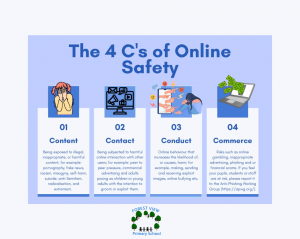
As a school, we work hard to ensure that our children are safe when using digital devices. We want them to be respectful users of digital technology at all times. In order to do this, we follow a stringent filtering and monitoring policy that is enforced by Smoothwall.
Intent:
Here at Forest View Primary School, we aim high for brighter futures. We work hard to raise the aspirations of our children and to provide good opportunities for their future prospects. Our intent is to ensure that our children become digitally literate and are able to develop their ideas in a way that will enable them to become successful digital citizens in primary school, secondary school and in the future workplace. We encourage children to master computing concepts so that they can develop their cultural capital for the future workplace.
Our progressive Computing curriculum is taught from EYFS through to year 6, where skills are developed and built upon each year. Computing is embedded throughout all areas of the curriculum ensuring that children gain appropriate knowledge and skills in each key stage.
The Computing curriculum is divided into three strands: Computer Science, Information Technology and Digital Literacy/e-Safety. Together, these strands enable our children to learn about computers and computer systems; how to design, build and analyse programs; and how to find, store and manage digital information safely and securely.
Our Computing curriculum is closely aligned with the National curriculum for Computing and aims to ensure all pupils:
- can understand and apply the fundamental principles and concepts of computer science, including abstraction, logic, algorithms and data representation (Computer science)
- can analyse problems in computational terms, and have repeated practical experience of writing computer programs in order to solve such problems (Computer science)
- can evaluate and apply information technology, including new or unfamiliar technologies, analytically to solve problems (Information technology)
- are responsible, competent, confident and creative users of information and communication technology. (Digital literacy)
Implementation:
At Forest View we have a robust and progressive Computing curriculum and framework that provides many opportunities for children to explore the three strands of Computing: Computer Science, Information Technology and Digital Literacy. We use a wide variety of high quality digital devices, physical computing devices, extra-curricular activities and educational visits to motivate and inspire our children. Teachers ensure that cross curricular links are embedded into other curriculum areas so that children can apply their learning to other subjects.
Computer Science
The core of computing is computer science, in which pupils are taught the principles of information and computation, how digital systems work and how to put this knowledge to use through programming.
In Key Stage One, children are introduced to early programming concepts by using floor robots. Children explore using individual commands, both with other learners and as part of a computer program. They will identify what each floor robot command does and use that knowledge to start predicting the outcome of programs. Children are also introduced to the early stages of program design through the introduction of algorithms. Children develop their understanding of instructions in sequences and use logical reasoning to predict outcomes. Children use given commands in different orders to investigate how the order affects the outcome. They will also learn about design in programming. They will develop artwork and test it for use in a program. They will design algorithms and then test those algorithms as programs and debug them.
Children learn to use on-screen programming through ScratchJr. Children explore the way a project looks by investigating sprites and backgrounds. They will use programming blocks to use, modify, and create programs. Children are introduced to the early stages of program design through the introduction of algorithms. Children go on to understand that sequences of commands have an outcome and make predictions based on their learning. They use and modify designs to create their own quiz questions in ScratchJr and realise these designs in ScratchJr using blocks of code. Finally, children evaluate their work and make improvements to their programming projects.
In Lower Key Stage Two, children build on their prior learning by exploring the concept of sequencing in programming through Scratch 3.0. It begins with an introduction to the programming environment, which will be new to most children. They will be introduced to a selection of motion, sound, and event blocks which they will use to create their own programs, featuring sequences. Children use their prior experiences of using ScratchJr to become familiar with the new learning environment in Scratch 3.0.
Children explore the links between events and actions, whilst consolidating prior learning relating to sequencing. Children begin by moving a sprite in four directions (up, down, left and right). They will then explore movement within the context of a maze, using design to choose an appropriately sized sprite. Children are given the opportunity to draw lines with sprites and change the size and colour of lines. The unit concludes with learners designing and coding their own maze tracing program.
Children progress from Scratch 3.0 to using Logo, a text-based programming platform, to create programs by planning, modifying, and testing commands to create shapes and patterns. Children use their new knowledge of text-based programming to carry out similar activities in Scratch 3.0, where they can discover similarities between two environments. Children look at the difference between count-controlled and infinite loops, and use their knowledge to modify existing animations and games using repetition.
In Upper Key Stage Two, children use physical computing devices such as Crumble controllers, Crumble controller emulators or micro:bits. Children will use physical computing to explore the concept of selection in programming through the use of the Crumble programming environment. Learners will be introduced to a microcontroller and learn how to connect and program components, including output devices- LEDs and motors, through the application of their existing programming knowledge. Children are introduced to conditions as a means of controlling the flow of actions and make use of their knowledge of repetition and conditions when introduced to the concept of selection through the ‘if, then’ structure.
Children use Scratch 3.0 to learn how the ‘If… Then… Else’, structure can be used to select different outcomes depending on whether a condition is true or false. They represent this understanding in algorithms and then by constructing programs using the Scratch 3.0 programming environment. They use their knowledge of writing programs and using selection to control outcomes to design a quiz in response to a given task and implement it as a program.
Children begin to understand the concept of variables in programming through games in Scratch. First, children find out what variables are and relate them to real-world examples of values that can be set and changed. Then they use variables to create a simulation of a scoreboard. Children follow the Use-Modify-Create model – children experiment with variables in an existing project, then modify them, before they create their own project.
Finally, children learn about sensing. This unit of work brings together aspects of their learning from all prior key stages. It offers children the opportunity to use all of these constructs in a different, but still familiar environment, while also utilising a physical device — the micro:bit. The unit begins with a simple program for pupils to build in and test within the new programming environment, before transferring it to their micro:bit.
Information Technology
Information Technology centres around the understanding that technology is everywhere. Children will be able to identify the technology they encounter and have a basic understanding of how it works. This will link to work on programming and algorithms.
Technology
In Key Stage One, children develop their understanding of technology and how it can help them. They become familiar with the different components of desktop computers, Chromebooks and iPads by developing their keyboard, mouse and trackpad skills. Children begin to learn how to use technology responsibly and what to do if they need help or see something they do not like. Children consider: How is information technology (IT) being used for good in our lives? With an initial focus on information technology in the home, learners explore how IT benefits society in places such as shops, libraries, and hospitals. Whilst discussing the responsible use of technology, and how to make smart choices when using it.
In Lower Key Stage Two, children develop their understanding of digital devices, with an initial focus on inputs, processes, and outputs. Children start by comparing digital and non-digital devices, before being introduced to computer networks that include network infrastructure devices like routers and switches.
Children apply their knowledge and understanding of networks, to appreciate the internet as a network of networks which need to be kept secure. Children learn that the World Wide Web is part of the internet, and will be given opportunities to explore the World Wide Web for themselves in order to learn about who owns content and what they can access, add, and create. Finally, children evaluate online content to decide how honest, accurate, or reliable it is, and understand the consequences of false information.
In Upper Key Stage Two, children develop their understanding of computer systems and how information is transferred between systems and devices. Children consider small-scale systems as well as large-scale systems. They will explain the input, output, and process aspects of a variety of different real-world systems. Children also take part in collaborative online projects with other class members and develop their skills in working together online.
Children explore how data is transferred over the internet. Children initially focus on addressing, before they move on to the makeup and structure of data packets. Children look at how the internet facilitates online communication and collaboration; they complete shared projects online and evaluate different methods of communication. Finally, they learn how to communicate responsibly by considering what should and should not be shared on the internet.
Key Learning
In Key Stage One, children create, store, manipulate and retrieve different digital materials by using programs to: word process, create images, take and use photographs, create music and animations and to create and use databases.
In Lower Key Stage Two, children create, store, manipulate and retrieve different digital materials by using programs to: develop their skills in desktop publishing, produce simple animations, edit audio and photographs, log data and to create and use branching databases.
In Upper Key Stage Two, children create, store, manipulate and retrieve different digital materials by using programs to: create vector drawings, edit video, create 3D models, web-pages, spreadsheets and to create and use flat-file databases.
Digital Literacy/e-Safety
Children need to be able to use technology safely. They need to keep their personal information private and treat other people with respect. If something goes wrong or they see something they don’t like they should know what to do and where to go for help.
At Forest View Primary School, children, staff and parents/carers are required to agree to an Acceptable Use Policy to ensure that they use school systems and networks safely and responsibly.
Throughout their time at Forest View Primary School, children access e-Safety lessons and workshops where they are taught to follow SMART Computing rules.
Impact:
Progress in Computing is demonstrated through the computing coordinator regularly reviewing and scrutinising children’s unplugged learning and digital portfolios. Evidence of children’s progress is gleaned from work scrutinies, pupil and staff voice interviews and the review of relevant documentation in accordance with our Computing assessment policy to ensure that progression of skills is taking place. When conducting Pupil Voice interviews, it is clear that children value their computational learning and, as they progress through the school, they are able to use their prior learning to make decisions on how to best approach new tasks.
The impact on our children is evident in their good progress and development of transferable digital skills. Our pupils develop the knowledge and skills that they need to succeed and they achieve well as a result. This is reflected in our school’s approach to assessing attainment and progress in children’s
computational learning. We aim that by the end of Key Stage Two, all of our children will have made considerable progress from their starting points in the Early Years Foundation Stage.
At Forest View Primary School, we want children to be ready for their next stage of education and to have skills that they can continue to develop. We aim for our children to understand and appreciate the value of Computing in the context of their personal wellbeing and the technological, creative and cultural industries and their many career opportunities.
Please click on the links below for all relevant documentations.
Be aware of your digital footprint
Forest View Primary School – Student Pupil Acceptable Use Agreement Form
Forest View Primary School – Parent/Carer Acceptable Use Policy
Forest View Primary School – Staff Acceptable Use Policy